Display Technology Deep Dive: OLED vs. LCD, Refresh Rates (60Hz vs. 120Hz), and Brightness Nits
Introduction: The Window to Your Digital World
Every interaction you have with your phone, TV, or monitor happens through a display. It is the primary interface between you and the digital world, yet most users understand surprisingly little about what makes one screen look dramatically better than another. Walk into any electronics store, and you’ll be bombarded with specifications—OLED, QLED, 120Hz, 4K, 2000 nits—but what do these terms actually mean for your daily experience?
The truth is that display quality is not a single specification but a combination of factors working together. A screen can excel in one area while failing in another, and understanding these trade-offs is essential for making informed purchasing decisions.
This guide provides a comprehensive deep dive into three critical aspects of display technology: the fundamental differences between OLED and LCD, the real-world impact of refresh rates from 60Hz to 120Hz and beyond, and the often-misunderstood measurement of brightness in nits. By the end, you’ll understand not just what these specifications mean, but how they actually affect your experience watching videos, reading text, playing games, and using your devices outdoors.
Part 1: OLED vs. LCD – The Great Display Divide
1.1 The Fundamental Difference: Light Production
The single most important distinction between display technologies is how they produce light .
LCD (Liquid Crystal Display) screens use a backlight that sits behind the display panel. This backlight shines through liquid crystals that open or close to control how much light passes through to create the image. Crucially, the backlight remains on even when displaying black—the liquid crystals simply block as much light as possible .
OLED (Organic Light Emitting Diode) screens work completely differently. Each pixel produces its own light independently. When you display black on an OLED screen, those pixels simply turn off completely. They emit zero light .
This fundamental architectural difference ripples through every aspect of image quality.
1.2 Image Quality: The OLED Advantage
The contrast advantage is perhaps the most noticeable difference. Because OLED pixels can turn completely off, the contrast between bright highlights and dark shadows is effectively infinite . This creates a sense of depth and realism that LCDs cannot match, regardless of how sophisticated their backlight technology becomes.
Color accuracy and vibrancy also favor OLED. With per-pixel light control, OLED displays can produce richer, more saturated colors that remain consistent even when viewed from extreme angles. LCDs, by contrast, often show color shifting and brightness loss when viewed off-center .
1.3 The LCD Counter-Argument: Brightness and Burn-In
LCD technology is not without its strengths. Because LCDs use a dedicated backlight, they can achieve higher sustained brightness levels than OLEDs . This makes them particularly effective in brightly lit environments, where an OLED’s perfect blacks may be washed out by ambient light while an LCD’s backlight punches through.
Burn-in remains a concern for OLED displays. Since each pixel ages independently based on how much it’s used, static elements like toolbars, status icons, or news tickers can cause uneven wear over time, leaving permanent “ghost” images . For devices used primarily for varied content (smartphones, TVs), this is rarely an issue. For monitors with fixed user interfaces, it requires mitigation strategies like pixel shifting and compensation cycles .
Modern OLEDs have largely addressed burn-in through improved materials and software compensation, but the theoretical vulnerability remains.
1.4 The 2026 Evolution: Next-Generation OLEDs
The CES 2026 trade show revealed significant advances in OLED technology that address traditional weaknesses .
Tandem WOLED panels from LG add an extra light-emitting layer, dramatically increasing full-screen brightness. Where previous WOLED monitors managed around 270 nits full-screen, the new generation achieves approximately 380 nits—closing the gap with LCD while maintaining OLED’s contrast advantages .
RGB Stripe WOLED introduces a traditional RGB subpixel layout to OLED displays. Previous WOLED monitors used an RGWB (red, green, white, blue) arrangement that could cause color fringing and make text appear less sharp. The new RGB stripe layout eliminates this problem, making OLED monitors far more suitable for productivity work involving text .
QD-OLED panels from Samsung have also advanced, with new anti-reflection coatings that solve a traditional weakness: blacks turning purplish under bright ambient light. Full-screen brightness has increased from 250 to 300 nits, with peak highlights reaching significantly higher .
V-Stripe QD-OLED introduces a new RGB stripe layout without sacrificing brightness or color performance, further improving text clarity .
1.5 Micro-LED: The Future on the Horizon
Micro-LED technology combines the best aspects of OLED (per-pixel lighting, perfect blacks) with the best aspects of LCD (extreme brightness, no burn-in). Each pixel is a microscopic LED that produces its own light, but using inorganic materials that don’t degrade over time .
The challenge is manufacturing: shrinking LEDs to microscopic scale and placing millions of them accurately is extraordinarily difficult and expensive. While Micro-LED is appearing in premium TVs and luxury applications, it remains years away from mainstream adoption.
Part 2: Refresh Rates – The Smoothness Factor
2.1 What Refresh Rate Actually Means
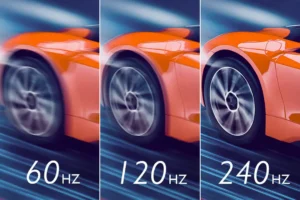
Refresh rate measures how many times per second your display updates its image. It is measured in Hertz (Hz). A 60Hz display refreshes 60 times per second; a 120Hz display refreshes 120 times per second .
Each refresh cycle takes a fixed amount of time:
60Hz: 16.6 milliseconds per frame
90Hz: 11.1 milliseconds per frame
120Hz: 8.3 milliseconds per frame
144Hz: 6.9 milliseconds per frame
The faster the refresh rate, the more frequently the screen can show new information, and the smoother motion appears .
2.2 The Perceptual Difference: 60Hz vs. 120Hz
Important clarification: Higher refresh rates do not make content move faster—they make motion look smoother . When you scroll through a webpage on a 60Hz screen, rapid swipes can appear “choppy” because the display only has 60 opportunities per second to update the animation. On a 120Hz screen, there are twice as many refresh slots, so transitions and animations look more fluid .
This difference is most noticeable in:
Scrolling through social feeds or long articles – text remains readable during rapid movement
Gaming – faster refresh rates reduce motion blur and improve reaction times
System animations – app opening/closing, home screen swiping feel more responsive
Cursor movement – mouse or touch gestures feel more connected to your input
For many users, the jump from 60Hz to 120Hz is similar to the difference between standard definition and high definition video: once experienced, it’s difficult to go back .
2.3 The Trade-Off: Battery Life and Efficiency
Higher refresh rates consume more power because the screen and graphics processor are working harder. Early high-refresh-rate phones could see battery life drops of 9–33% when switching from 60Hz to 90Hz or 120Hz modes .
Modern devices address this through adaptive refresh rates enabled by LTPO (Low Temperature Polycrystalline Oxide) backplane technology .
How LTPO works:
When you’re scrolling through social media or gaming → refresh rate ramps to 120Hz for smoothness
When you’re reading a static page or viewing a photo → refresh rate drops as low as 1–10Hz to save power
During video playback → refresh rate synchronizes to the content’s frame rate (24Hz, 30Hz, 60Hz)
This dynamic adjustment delivers the benefits of high refresh rates when they matter while minimizing battery impact during less demanding activities .
LTPO evolution:
LTPO 1.0: Adjusts within a predefined range (e.g., 10–120Hz) with moderate transition speed
LTPO 2.0: Smoother, faster transitions with ranges extending as low as 1Hz for better efficiency
2.4 Content Matching: Why 120Hz Works for Video
One subtle advantage of 120Hz displays is their ability to handle multiple video frame rates cleanly. Most films are shot at 24 frames per second. A 120Hz display can play 24fps content by refreshing each frame exactly 5 times (24 × 5 = 120), creating smooth playback without the “judder” that can occur when 24fps content is converted to 60Hz .
Similarly, 30fps and 60fps content divide evenly into 120Hz, ensuring smooth, artifact-free video playback.
2.5 Gaming: Where Every Millisecond Counts
For mobile and PC gamers, high refresh rates offer tangible competitive advantages. Faster refresh rates mean lower latency between your input and what appears on screen. Combined with high frame rates from the graphics processor, this creates a more responsive, immersive experience .
The ideal combination is:
120Hz+ display capable of showing many frames per second
Game supporting high frame rates (not capped at 30 or 60 FPS)
Sufficient processing power to maintain those frame rates consistently
Competitive gamers often prefer 144Hz or even 240Hz monitors for the smoothest possible motion and lowest latency .
2.6 2026 Status: High Refresh Rate as Standard
In 2026, high refresh rate displays have moved from premium feature to mainstream expectation. Most flagship and mid-range smartphones now offer 120Hz displays, with even budget devices frequently including 90Hz panels . The latest iPhone 17, Samsung Galaxy S25, and Google Pixel 10 series all feature adaptive 120Hz displays across their lineups .
For monitors, 2026 is seeing the introduction of displays with even higher refresh rates. Nvidia’s Pulsar technology, appearing in multiple 360Hz monitors, combines backlight strobing with variable refresh rate to reduce motion blur in fast-paced games .
Part 3: Brightness – The Nits Story
3.1 What Are Nits?
Nits (candelas per square meter) measure the amount of light your display emits. One nit equals one candela of light intensity per square meter of display area .
Modern displays range from about 400 nits for budget devices to over 2,000 nits for premium flagships .
3.2 Peak Brightness vs. Typical Brightness vs. High Brightness Mode
This is where marketing often obscures reality. Brightness specifications actually refer to three different measurements :
Peak brightness is the most aggressively marketed number—and the most misunderstood. It refers to the maximum brightness achievable on a small portion of the display (typically 1–10% of the screen) for short durations when displaying HDR content . It cannot be sustained across the entire screen without overheating or excessive power consumption.
Manufacturers quote numbers like 4,500 or even 6,000 nits, but these figures represent tiny highlight areas in HDR content, not full-screen outdoor visibility .
High Brightness Mode (HBM) is actually the more important specification for outdoor usability. This is the full-screen brightness achieved when automatic brightness boosts the display in direct sunlight. A phone with 1,000–1,600 nits HBM will be comfortably readable outdoors; one with only 600 nits HBM may be difficult to see .
Typical brightness (400–800 nits) matters for indoor comfort and battery life .
3.3 Why Brightness Matters
Outdoor visibility is the primary practical concern. In direct sunlight, ambient light washes out the display, and higher brightness helps overcome this. A screen with insufficient brightness becomes unreadable outdoors—a major issue for navigation, photography, or any outdoor use .
HDR content also benefits from high peak brightness. High dynamic range video requires bright highlights (sun glinting off water, explosions, specular reflections) to create a convincing range between deepest blacks and brightest whites. Higher peak brightness enables more dramatic, lifelike HDR .
3.4 OLED vs. LCD Brightness
The two technologies approach brightness differently :
LCDs use a dedicated backlight that can sustain high brightness across the entire screen. This makes them effective outdoors but limits contrast.
OLEDs have traditionally struggled with full-screen brightness but excel at peak brightness in small areas. A single bright highlight on an OLED can be extremely bright while the rest of the screen remains dark—perfect for HDR but less effective for full-screen outdoor visibility.
Recent OLED advances (like LG’s tandem WOLED) are closing this gap, achieving 380 nits full-screen brightness while maintaining OLED’s contrast advantages .
3.5 The 2026 Brightness Landscape
Source:
The trend is clear: peak brightness numbers are escalating rapidly, but HBM improvements are more modest and arguably more relevant to daily use.
Part 4: How They Work Together – The Complete Picture
4.1 The Three Pillars of Display Quality
A truly great display requires excellence across all three dimensions:
The best displays balance all three. An OLED with 120Hz LTPO and 1,600 nits HBM represents the current sweet spot—perfect blacks, silky smooth scrolling, and outdoor readability.
4.2 Real-World Scenarios
4.3 What to Look For When Buying
For smartphones in 2026:
For monitors:
Gaming: 120Hz+ refresh rate, OLED response time, variable refresh rate support
Content creation: OLED or high-end IPS, color accuracy, RGB stripe for text clarity
Productivity: Larger size, high resolution, consider LCD for static UI elements (burn-in avoidance)
For TVs:
OLED for home theater (perfect blacks, HDR performance)
QLED/Mini-LED for bright rooms (higher sustained brightness)
Part 5: The 2026 State of the Art
5.1 Smartphones
Flagship smartphones in 2026 universally feature:
OLED panels (mostly LTPO for adaptive refresh)
120Hz refresh rates as standard
HBM of 1,000–1,600 nits
Peak brightness figures ranging from 2,000–6,000 nits (increasingly marketing-driven)
The iPhone 17, Samsung Galaxy S25, and Google Pixel 10 series all deliver this combination, with the practical difference coming down to implementation quality rather than specification checkboxes .
5.2 Monitors
The monitor market is seeing rapid OLED adoption, with both LG and Samsung introducing next-generation panels :
LG 39GX950B: 39-inch 5K2K WOLED, 165Hz, 380 nits full-screen brightness, 1500R curve
LG 32-inch 4K OLED: 240Hz, 380 nits full-screen brightness
Samsung 34-inch QD-OLED: 3440×1440, 330Hz, 300 nits full-screen brightness, RGB V-Stripe layout
LCD monitors are fighting back with high pixel density (220+ ppi), Mini-LED backlighting with thousands of dimming zones, and sustained brightness up to 1,250 nits .
5.3 Emerging Technologies
Tandem OLED (stacking multiple light-emitting layers) is moving from automotive and mobile applications into larger displays, dramatically improving brightness and longevity .
Micro-LED continues to advance, with applications in luxury TVs and AR/VR displays, but remains too expensive for mainstream adoption .
Hybrid OLED (glass substrate + thin-film encapsulation) is expanding from mobile to IT applications, enabling thinner, lighter panels .
Conclusion: Beyond the Spec Sheet
Display technology has reached a remarkable level of sophistication. The differences between a mediocre screen and an exceptional one are real and noticeable, but they cannot be reduced to any single number.
The megapixel myth taught us that more isn’t always better. The same lesson applies here: 6,000 nits peak brightness sounds impressive, but it matters far less than 1,200 nits of sustained outdoor brightness. 120Hz refresh rates deliver genuine smoothness, but LTPO technology makes them practical. OLED offers unbeatable contrast, but LCD still wins on sustained brightness.
When evaluating a display, look beyond the headline specifications:
Is it OLED or LCD? This determines the fundamental character of the image.
Does it support 120Hz with adaptive refresh? This affects daily smoothness and battery life.
What is its HBM (not just peak) brightness? This determines outdoor usability.
For monitors, does it use RGB stripe layout? This affects text clarity for productivity.
The best display is not the one with the highest number in any single category, but the one that balances all three pillars—technology, smoothness, and brightness—to match how you actually use your device.
In 2026, that balance has never been better—or more confusing to navigate. Armed with this understanding, you can cut through the marketing and choose the display that truly deserves your attention.