Living with the Framework Laptop: A Six-Month Review of the Modular Dream
The Modular Manifesto: More Than a Laptop
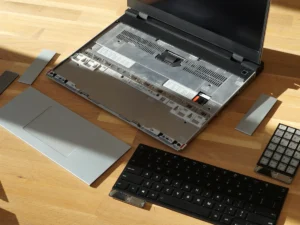
When I first unboxed the Framework Laptop, it didn’t feel like unpacking a consumer device. It felt like receiving a toolkit—one that happened to assemble into a premium, 13.5-inch ultrabook. Framework Computer didn’t just release a product; they issued a philosophical challenge to the entire industry. Could a laptop be thin, powerful, and completely repairable and upgradeable by its owner? After living with it as my daily driver for six months, I can deliver a definitive verdict: not only is it possible, but this modularity fundamentally changes your relationship with technology. This is the story of what it’s like to actually live with a laptop that is designed to be opened.
First Impressions: The Joy of Assembly
For my model—the Framework Laptop 13 with an Intel Core i7-1360P—I chose the DIY Edition. This isn’t a bare circuit board; it’s a kit where you install your own RAM, storage, and Wi-Fi card. The process, guided by Framework’s impeccably clear instructions, is revelatory. In 30 minutes, you go from a box of components to a functioning computer. You feel the satisfying click of the RAM modules, the secure screw of the NVMe SSD, and the gentle press of the keyboard into its magnetic connectors.
The immediate takeaway: this laptop has no secrets. There’s no mystery about what’s inside or fear of breaking hidden clips. Every connection is logical, labeled, and tool-less where possible. This initial assembly builds a sense of ownership and confidence that is utterly absent when unboxing a sealed MacBook or Dell XPS.
Daily Use: The Premium Core Experience
Once assembled, you forget it’s modular. It’s simply a great laptop.
Build Quality & Design: The aluminum chassis is rigid and premium, rivaling the best in the class. The 3:2 aspect ratio display (2256 x 1504) is excellent for productivity, offering more vertical space for documents and web pages. The keyboard is tactile and quiet, and the large touchpad is precise.
Performance: With 32GB of RAM and a 2TB SSD, it flies through my workload of 50+ browser tabs, photo editing in Lightroom, and software development environments. It’s not a gaming laptop, but for a productivity ultrabook, it has more than enough power. The battery life is its most average trait—I get a solid 6-8 hours of real-world use, which is competitive but not class-leading.
The Modular Superpower: Expansion Cards: This is where daily life gets fun. The four USB-C Expansion Card slots aren’t just ports; they’re hot-swappable modules. My default setup is two USB-C, one USB-A, and one HDMI. When I go to a meeting, I swap the HDMI for a second USB-A for flash drives. When traveling light, I pop in two USB-C cards and two blank plates for a cleaner look. This flexibility is genuinely useful, not a gimmick.
The Real-World Test: When Modularity Pays Off
The theory is nice, but life happens. Here’s where the Framework thesis was proven in my own home.
The Spilled Drink Incident: A cup of tea met my keyboard. On any other laptop, this would have been a heart-stopping, potentially multi-hundred-dollar disaster. On the Framework, it was a 5-minute, $29 problem. I shut down the laptop, removed two screws holding the keyboard, disconnected its single cable, and lifted it out. I ordered a new keyboard module from Framework’s marketplace, installed it when it arrived two days later, and was back in business. The cost and downtime were minimal.
The Storage Upgrade: As my project files grew, my 1TB SSD felt cramped. An upgrade involved 4 screws to remove the bottom case and one more to swap the SSD. Total time: 3 minutes. No cloning software needed—I installed a fresh OS on the new drive and was back up in under an hour.
The “Mainboard” Upgrade: This is Framework’s pièce de résistance. After a year, instead of buying a whole new laptop, I could purchase a new Mainboard with a latest-generation CPU, newer ports, and better efficiency. I haven’t done this yet, but knowing I can—and that it will take about 20 minutes—is revolutionary. It turns the laptop from a disposable appliance into a long-term platform.
The Ecosystem & Community: You’re Not Alone
Framework has nurtured a remarkable community. The company publishes full 3D CAD files for its chassis, allowing third parties to design and sell custom parts. On Etsy and the Framework forum, you can find:
Custom Top Cases: Wood, colored aluminum, or even acrylic “clear” lids.
Specialized Expansion Cards: From microSD readers to high-end audio DACs, built by enthusiasts.
Bespoke Mods: People have built their own cases, added internal fans, and created wild experimental expansions.
This turns ownership into participation. You’re not just a consumer; you’re part of a collaborative project to build a better, more sustainable kind of computer.
The Trade-offs: What You Give Up
No design is perfect, and the Framework makes clear choices in favor of repairability.
Battery Life: As mentioned, it’s good, not great. The modular design and standard components likely sacrifice some space and power optimization that fully integrated designs achieve.
Absolute Thinness: At about 15.9mm thick, it’s not the slimmest ultrabook on the market. That extra millimeter or two houses the modular connectors and allows for the easy-open bottom case.
The “Beta” Feeling (Occasionally): While the core experience is polished, some community mods or early-adopter software tweaks can feel like you’re on the cutting edge, for better or worse.
The Framework Laptop 16: Expanding the Vision
My experience is with the 13-inch model, but Framework’s recent release of the Framework Laptop 16 validates the entire concept. It takes modularity further with a swappable GPU bay and a removable input deck that can be replaced with alternative modules (like a numpad or secondary screen). It proves the architecture can scale to high-performance, larger-form-factor machines.
Conclusion: The Laptop That Grows With You
Living with the Framework Laptop has been an education. It has cured me of the “what if it breaks?” anxiety that accompanies every other premium device. It has saved me money and time. More importantly, it has restored a sense of agency.
You are not paying for a sealed black box whose value declines predictably. You are investing in a platform. The initial cost is comparable to other premium ultrabooks, but the total cost of ownership is lower, and the lifespan is potentially twice as long.
Who is it for?
The Tinkerer, the curious, and the self-sufficient.
The Environmentalist, who wants to minimize e-waste and consumerism.
The Professional who values longevity and uptime (easy repairs mean less downtime).
Anyone tired of feeling powerless in the face of planned obsolescence.
Who should skip it?
Those who want the absolute longest battery life above all else.
Users who want a zero-maintenance appliance and have no interest in ever opening their device.
People who upgrade their entire laptop every 1-2 years regardless.
The Framework Laptop is a triumph. It proves that the trade-off between sleek, powerful tech and user repairability is a false one, engineered by companies that profit from planned obsolescence. It is not just a laptop you buy; it’s a laptop you keep. And in a world of disposable electronics, that might be the most radical feature of all.
































































































