IP Addressing: The Complete Guide to Internet Protocol Addressing
Introduction: The Digital Postal System of the Internet
Every device connected to the internet—from smartphones to servers, smart refrigerators to supercomputers—requires a unique identifier to communicate, just as every house needs a unique address to receive mail. This digital addressing system, known as Internet Protocol (IP) addressing, forms the fundamental infrastructure that enables global connectivity. This comprehensive guide explores the architecture, evolution, implementation, and future of IP addressing, the invisible framework that makes the modern internet possible.
Section 1: The Foundation – What is an IP Address?
Definition and Purpose
An Internet Protocol (IP) address is a numerical label assigned to each device participating in a computer network that uses the Internet Protocol for communication. It serves two primary functions:
Host or network interface identification
Location addressing (providing a means to find the device on the network)
The Analogy: Physical vs. Digital Addressing
Physical World                    Digital World
---------------                  ---------------
Street Address: 123 Main St.     IP Address: 192.168.1.10
City: Anytown                    Network: 192.168.1.0/24
ZIP Code: 12345                  Subnet Mask: 255.255.255.0
Country: USA                     Default Gateway: 192.168.1.1
Core Characteristics
Uniqueness: Each IP address must be unique within its network scope
Hierarchical structure: Organized for efficient routing
Dual role: Identifies both the network and the specific host
Temporary or permanent: Can be static or dynamically assigned
Section 2: The Evolution – From IPv4 to IPv6
IPv4: The Foundation (1981-Present)
Structure and Format:
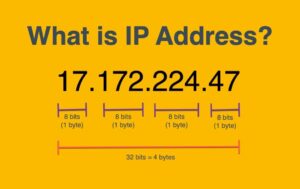
32-bit address: 4 octets separated by periods (dotted-decimal notation)
Example: 192.168.1.1
Total addresses: 2³² = 4,294,967,296 (approximately 4.3 billion)
Binary representation: 11000000.10101000.00000001.00000001
The IPv4 Exhaustion Crisis:
Depletion timeline: Final /8 blocks allocated in 2011
Root cause: Exponential internet growth unanticipated in 1970s design
Regional exhaustion: APNIC (2011), RIPE NCC (2012), LACNIC (2014)
Current status: Commercially available but at premium prices
IPv6: The Solution (1998-Present)
Structure and Format:
128-bit address: 8 groups of 4 hexadecimal digits separated by colons
Example: 2001:0db8:85a3:0000:0000:8a2e:0370:7334
Compressed form: 2001:db8:85a3::8a2e:370:7334 (leading zeros omitted, :: for consecutive zeros)
Total addresses: 2¹²⁸ ≈ 340 undecillion (3.4×10³⁸)
Adequacy: Approximately 665×10²¹ addresses per square meter of Earth’s surface
Key Improvements over IPv4:
Vast address space: Effectively unlimited for foreseeable future
Simplified header: Fixed length, optimized for processing
Built-in security: IPsec implementation is mandatory
Auto-configuration: Stateless address configuration (SLAAC)
Efficient routing: Hierarchical addressing reduces routing table size
Better multicast: Native support without workarounds
IPv6 Address Types:
Unicast: One-to-one communication (global, link-local, unique-local)
Multicast: One-to-many communication
Anycast: One-to-nearest communication (multiple devices share address)
Current Adoption Status (2024):
Global average: ~40% of users access Google via IPv6
Leading countries: India (~70%), Germany (~65%), USA (~50%)
Major providers: Comcast, Verizon, T-Mobile have extensive deployment
Challenges: Legacy equipment, knowledge gaps, dual-stack complexity
Section 3: IPv4 Addressing in Depth
Address Classes (Historical but Influential)
Classful Addressing (Pre-CIDR):
Class A: 0.0.0.0 - 127.255.255.255
  • First octet: 0-127
  • Network/Host: N.H.H.H
  • Subnet mask: 255.0.0.0 (/8)
  • Networks: 128 (0-127, but 0 and 127 reserved)
  • Hosts per network: 16,777,214

Class B: 128.0.0.0 - 191.255.255.255
  • First octet: 128-191
  • Network/Host: N.N.H.H
  • Subnet mask: 255.255.0.0 (/16)
  • Networks: 16,384
  • Hosts per network: 65,534

Class C: 192.0.0.0 - 223.255.255.255
  • First octet: 192-223
  • Network/Host: N.N.N.H
  • Subnet mask: 255.255.255.0 (/24)
  • Networks: 2,097,152
  • Hosts per network: 254

Class D: 224.0.0.0 - 239.255.255.255 (Multicast)
Class E: 240.0.0.0 - 255.255.255.255 (Experimental)
Limitations of Classful Addressing:
Rigid boundaries: Wasted address space (company needing 300 hosts got Class B with 65k addresses)
Routing table explosion: Each network required separate entry
Inefficient allocation: Led to rapid IPv4 exhaustion
CIDR: Classless Inter-Domain Routing (1993)
The Solution to Classful Limitations:
Variable Length Subnet Masking (VLSM): Subnets of different sizes within same network
CIDR notation: IP address followed by slash and prefix length (192.168.1.0/24)
Route aggregation: Multiple networks advertised as single route
Efficient allocation: ISPs get blocks they can subnet appropriately
CIDR Notation Examples:
192.168.1.0/24: 256 addresses (192.168.1.0 – 192.168.1.255)
10.0.0.0/8: 16,777,216 addresses (entire 10.x.x.x range)
172.16.0.0/12: 1,048,576 addresses (172.16.0.0 – 172.31.255.255)
Special and Reserved IPv4 Addresses
Private Address Ranges (RFC 1918):
10.0.0.0/8: Single Class A network
172.16.0.0/12: 16 contiguous Class B networks
192.168.0.0/16: 256 contiguous Class C networks
Purpose: Not routable on public internet, used behind NAT
Other Special Addresses:
Loopback: 127.0.0.0/8 (typically 127.0.0.1)
Link-local: 169.254.0.0/16 (APIPA – Automatic Private IP Addressing)
Multicast: 224.0.0.0/4
Limited broadcast: 255.255.255.255
Documentation/Examples: 192.0.2.0/24, 198.51.100.0/24, 203.0.113.0/24
Section 4: Subnetting – The Art of Network Division
Binary Foundation
Decimal to Binary Conversion:
192 = 11000000
168 = 10101000
1   = 00000001
0   = 00000000

Subnet Mask 255.255.255.0 = 11111111.11111111.11111111.00000000
CIDR /24 = 24 network bits, 8 host bits
Subnetting Process
Step-by-Step Example: Creating subnets from 192.168.1.0/24
Requirements:
5 departments needing: 50, 25, 20, 10, and 5 hosts respectively
Efficient allocation with room for growth
Solution:
List requirements in descending order: 50, 25, 20, 10, 5
Calculate needed host bits: 2ʰ – 2 ≥ hosts required
50 hosts: 2⁶ – 2 = 62 (needs 6 host bits, /26 subnet)
25 hosts: 2⁵ – 2 = 30 (needs 5 host bits, /27 subnet)
etc.
Allocate sequentially:
Network: 192.168.1.0/24

Subnet 1: 192.168.1.0/26  (50 hosts)
  • Range: 192.168.1.0 - 192.168.1.63
  • Usable: 192.168.1.1 - 192.168.1.62
  • Broadcast: 192.168.1.63

Subnet 2: 192.168.1.64/27 (25 hosts)
  • Range: 192.168.1.64 - 192.168.1.95
  • Usable: 192.168.1.65 - 192.168.1.94
  • Broadcast: 192.168.1.95

Subnet 3: 192.168.1.96/27 (20 hosts, same as above)
Subnet 4: 192.168.1.128/28 (10 hosts)
Subnet 5: 192.168.1.144/29 (5 hosts)
Subnetting Cheat Sheet
CIDR   Subnet Mask        Hosts    Networks from /24
----   -----------        -----    -----------------
/25    255.255.255.128    126      2
/26    255.255.255.192    62       4
/27    255.255.255.224    30       8
/28    255.255.255.240    14       16
/29    255.255.255.248    6        32
/30    255.255.255.252    2        64 (Point-to-point)
/31    255.255.255.254    2*       128 (RFC 3021, no broadcast)
/32    255.255.255.255    1        256 (Single host route)
Section 5: IP Address Allocation and Management
The Global Hierarchy
Internet Assigned Numbers Authority (IANA):
Role: Global coordinator of IP addressing
Function: Allocates blocks to Regional Internet Registries (RIRs)
Parent organization: ICANN (Internet Corporation for Assigned Names and Numbers)
Regional Internet Registries (RIRs):
AFRINIC: Africa
APNIC: Asia-Pacific
ARIN: United States, Canada, Caribbean
LACNIC: Latin America and Caribbean
RIPE NCC: Europe, Middle East, Central Asia
National Internet Registries (NIRs):
Local Internet Registries (LIRs):
End Users: Organizations and individuals
Allocation Process Example
IANA → RIR (APNIC) → NIR (JPNIC) → LIR (ISP) → Business Customer → Department → Host
Public vs. Private Addressing
Public IP Addresses:
Private IP Addresses (RFC 1918):
Not routable on public internet
Reusable across different private networks
Require NAT to access internet
Three ranges: 10.0.0.0/8, 172.16.0.0/12, 192.168.0.0/16
Dynamic vs. Static Assignment
DHCP (Dynamic Host Configuration Protocol):
Automatic assignment: IP address, subnet mask, gateway, DNS servers
Lease-based: Temporary assignment (typically 24 hours)
Renewal: Clients automatically request extension
Efficiency: Reuses addresses from pool
Default for: Most end-user devices
Static Assignment:
Manual configuration: Set on device itself
Permanent: Doesn’t change unless manually reconfigured
Use cases: Servers, network equipment, printers
Advantages: Predictable, reliable for services
Disadvantages: Administrative overhead, potential conflicts
APIPA (Automatic Private IP Addressing):
Section 6: NAT – Extending IPv4 Lifespan
Network Address Translation Fundamentals
The NAT Concept:
Multiple private addresses share one or few public addresses
RFC 1918 realization: Private addresses aren’t routable, need translation
Primary benefit: Conserves public IPv4 addresses
Basic NAT Operation:
Private Network          NAT Router           Public Internet
-------------           ----------           ---------------
192.168.1.10:5000  →  Translate  →  203.0.113.5:6000  →  Web Server
                            ↓
192.168.1.11:5000  →  Translate  →  203.0.113.5:6001  →  Web Server
NAT Types
1. Static NAT:
2. Dynamic NAT:
Pool of public addresses shared dynamically
First-come, first-served from pool
Limitation: Number of simultaneous connections ≤ pool size
3. PAT (Port Address Translation) / NAT Overload:
Most common type (home routers use this)
Multiple private addresses map to single public address
Uses port numbers to distinguish connections
Theoretical limit: ~65,000 connections per public IP
4. Carrier-Grade NAT (CGN/LSN):
ISPs use: Multiple customers share public IPs
Double NAT: Customer NAT → ISP NAT → Internet
Controversial: Breaks some applications, privacy concerns
NAT Limitations and Issues
Application Breaking:
IP in payload: FTP, SIP, some gaming protocols
Peer-to-peer: Direct connections difficult
Geo-location: Services see NAT address, not user’s
Performance Impact:
State table maintenance overhead
Connection tracking resource consumption
Mitigation: Hardware acceleration in modern routers
Security Considerations:
Obfuscation: Hides internal network structure
Not a firewall: Often confused with security function
Vulnerabilities: State table exhaustion attacks
Section 7: Practical IP Addressing
Address Planning Best Practices
Enterprise Network Design Example:
Headquarters: 10.0.0.0/16
  • Infrastructure: 10.0.0.0/24    (Routers, switches, management)
  • Servers: 10.0.1.0/24           (Data center)
  • User VLANs: 10.0.10.0/23       (512 users, /23 = 510 hosts)
  • Wireless: 10.0.20.0/24
  • Guests: 10.0.30.0/24
  • IoT: 10.0.40.0/24
  • Future: 10.0.50.0/24 - 10.0.100.0/24

Branch Offices: 10.1.0.0/16, 10.2.0.0/16, etc.
  • Consistent subnetting scheme across locations

VPN/Remote: 10.254.0.0/16
Troubleshooting Common Issues
IP Conflict:
Symptoms: Intermittent connectivity, “IP conflict” warnings
Detection: arp -a shows multiple MACs for same IP
Resolution: DHCP cleanup, static assignment review
Incorrect Subnet Mask:
Symptom: Can ping some devices but not others in same network
Check: Compare ipconfig/ifconfig output on multiple devices
Example: Computer with 255.255.255.0 can’t reach 255.255.0.0 device
Default Gateway Issues:
Symptom: Local network works, no internet
Test: ping 8.8.8.8 fails, ping local_device works
Check: Gateway IP, gateway connectivity, routing table
DNS vs. IP Problems:
Diagnosis: ping google.com fails but ping 8.8.8.8 works
Indicates: DNS configuration issue, not IP addressing
Useful Command-Line Tools
Windows:
ipconfig /all              # Display all IP configuration
ping 192.168.1.1           # Test connectivity
tracert 8.8.8.8            # Trace route path
arp -a                     # Show ARP table
nslookup google.com        # DNS query
Linux/macOS:
ifconfig or ip addr
ping 192.168.1.1
traceroute 8.8.8.8
arp -a
dig google.com
netstat -rn
Section 8: IPv6 Implementation and Transition
IPv6 Address Types and Usage
Global Unicast Address (GUA):
Range: 2000::/3 (2000: – 3fff:)
Structure: Global routing prefix (48 bits) + Subnet ID (16 bits) + Interface ID (64 bits)
Example: 2001:db8:1234:5678::1/64
Link-Local Address:
Range: fe80::/10
Automatically assigned: To every IPv6 interface
Scope: Only valid on local link (not routable)
Example: fe80::1a2b:3c4d:5e6f:1a2b%eth0
Unique Local Address (ULA):
Range: fc00::/7 (similar to IPv4 private addresses)
Not routable on internet: But globally unique
Example: fd00:1234:5678::/48
Multicast Address:
Range: ff00::/8
Well-known examples:
ff02::1: All nodes on local link
ff02::2: All routers on local link
ff02::1:ffxx:xxxx: Solicited-node multicast
IPv6 Address Assignment Methods
Stateless Address Autoconfiguration (SLAAC):
Process: Router Advertisement (RA) + Interface ID generation
Interface ID: Often derived from MAC address (EUI-64)
Privacy concern: MAC-based addressing allows tracking
Solution: Privacy extensions generate temporary addresses
DHCPv6:
Two modes: Stateful (assigns addresses) and Stateless (other parameters)
Advantage over SLAAC: More control, easier logging
Common in enterprises: Better manageability
Manual Configuration:
Similar to IPv4: Set address, prefix, gateway
Use cases: Servers, routers, critical infrastructure
Transition Technologies
Dual Stack:
Most common approach: Run IPv4 and IPv6 simultaneously
Requirement: Applications must support both
Advantage: Seamless experience based on destination capability
Tunneling:
6in4: IPv6 encapsulated in IPv4 packets
6to4: Automatic tunneling using anycast address
Teredo: IPv6 over UDP through NATs
Advantage: Connect IPv6 islands over IPv4 infrastructure
Translation:
NAT64: IPv6 to IPv4 translation
DNS64: Synthesizes AAAA records from A records
Use case: IPv6-only clients accessing IPv4-only servers
IPv6 Subnetting Simplicity
Standard Practice:
/64 subnets: Standard for most networks
Reason: Required for SLAAC, efficient for router advertisements
Example allocation:
ISP allocation: 2001:db8:1234::/48
Customer networks:
  • Office LAN: 2001:db8:1234:0001::/64
  • WiFi: 2001:db8:1234:0002::/64
  • Servers: 2001:db8:1234:0003::/64
  • Future: 2001:db8:1234:0004::/64 - ffff::/64
Benefits over IPv4 Subnetting:
No broadcast: Uses multicast instead
No NAT (typically): End-to-end connectivity restored
Auto-configuration: Reduces administrative overhead
Abundant addresses: No need for tight allocation
Section 9: Security Considerations
IP Address-Based Threats
Reconnaissance:
IP scanning: Probing address ranges for active hosts
Service identification: Port scanning discovered hosts
Defense: Firewalls, intrusion prevention, network segmentation
Spoofing:
Source IP forgery: Sending packets with false source address
Uses: DoS amplification, anonymity, bypassing IP-based ACLs
Prevention: Ingress/egress filtering (BCP38/84), uRPF
Amplification Attacks:
Mechanism: Small query generates large response to spoofed victim
Protocols abused: DNS, NTP, SNMP, SSDP
Mitigation: Rate limiting, protocol-specific fixes
Privacy Implications
IP Address as Identifier:
Persistent tracking: Even with dynamic addresses
Geo-location: Typically accurate to city level
Behavioral correlation: Across websites/services
Mitigation Strategies:
VPNs: Mask true IP address
TOR/Onion routing: Multi-layer encryption and routing
ISP practices: Rapid DHCP rotation, IPv6 privacy extensions
Application design: Minimize IP logging, use anonymization
IPv6 Security Considerations
Increased Scanning Difficulty:
Challenge: 2⁶⁴ addresses per subnet makes scanning impractical
But: Addresses often predictable (EUI-64, sequential assignment)
Best practice: Use privacy extensions, random addressing
New Attack Vectors:
Router Advertisement attacks: Spoofed RAs can redirect traffic
Extension header abuse: Could evade security controls
Mitigation: RA Guard, proper firewall rules for IPv6
Dual-Stack Concerns:
Asymmetric security: IPv4 and IPv6 might have different rules
Tunneling risks: Transition technologies create new attack surfaces
Recommendation: Equal security for both protocols
Section 10: Future of IP Addressing
IPv6 Adoption Acceleration
Drivers of Adoption:
Mobile networks: LTE/5G natively IPv6
IoT expansion: Billions of devices need addresses
Cloud providers: Major clouds fully support IPv6
Government mandates: Some require IPv6 capability
Projected Timeline:
2025: Majority of internet traffic over IPv6
2030: IPv4 becomes legacy, maintained for compatibility
Beyond: Possible IPv4 sunsetting in certain segments
New Addressing Models
Segment Routing IPv6 (SRv6):
Concept: Source routing with IPv6 extension headers
Benefits: Simplified network programming, traffic engineering
Status: Emerging in carrier networks
Blockchain-Based Addressing:
Experimental: Self-sovereign identity tied to IP space
Potential: Decentralized address allocation
Challenges: Integration with existing infrastructure
Quantum Computing Implications
Cryptographic Concerns:
Current issue: Public key infrastructure relies on hard math problems
Quantum threat: Shor’s algorithm could break current cryptography
Preparation: Post-quantum cryptography standardization underway
Addressing in Quantum Networks:
Research area: Quantum internet with entanglement-based communication
Different paradigm: May require new addressing concepts entirely
Timeline: Experimental stages currently
Environmental Considerations
Energy Efficiency:
IPv6 advantage: Simplified headers reduce processing
Hardware refresh: Newer IPv6-optimized equipment more efficient
Lifecycle management: Phasing out IPv4-only devices
E-Waste Reduction:
Extended lifespan: Dual-stack capability extends device usefulness
Standardization: Global addressing reduces need for NAT hardware
Resource optimization: Efficient allocation reduces overall hardware needs
Conclusion: The Invisible Foundation of Connectivity
IP addressing represents one of the most elegant yet practical engineering solutions of the digital age—a hierarchical, scalable system that has grown from connecting a few research computers to enabling a global network of billions of devices. Its evolution from the constrained IPv4 to the expansive IPv6 mirrors the internet’s own transformation from academic project to essential global infrastructure.
Understanding IP addressing is more than technical knowledge; it’s literacy in the language of digital connectivity. From network engineers designing global infrastructures to developers creating distributed applications, from security professionals defending networks to policymakers shaping internet governance—all engage with the implications of this fundamental system.
As we move toward an increasingly connected world—with 5G, IoT, edge computing, and eventually quantum networks—the principles of IP addressing will continue to evolve but remain essential. The transition to IPv6, while gradual, represents a necessary step toward sustaining the internet’s growth and innovation potential.
The most successful future networks will be those that leverage the strengths of both IPv4 and IPv6 during the extended transition, while preparing for new addressing paradigms that may emerge. What remains constant is the need for addresses that are both unique identifiers and efficient locators—the dual function that has made IP addressing endure for decades.
In mastering IP addressing, we gain not just technical capability but a deeper understanding of how our connected world is structured—and how we might shape its future architecture. Whether working with the familiar dotted-decimal notation of IPv4 or the hexadecimal colons of IPv6, we’re engaging with a system that, though often invisible to end users, forms the very foundation of our digital lives.